Posted by
Prem Sabarwal
at
8:40 PM
Tuesday, February 9, 2010
Videora iPod Converter is a freeware that allows you to convert video files, YouTube videos, movies and DVD's for your iPod and iPhone. It can convert all types of video files (avi, divx, xvid, flv, x264, vob, mpeg, DVD's, YouTube, etc.) into the proper video formats (MPEG-4, H.264) that play on the iPod.
Posted by
Prem Sabarwal
at
10:47 PM
Monday, February 1, 2010
I have mentioned few tips to get a better battery life and a longer runtime for your iPhone and iPod.
Turn off the push email incase you don’t use it (Settings > Mail, Contacts, Calendar > Fetch New Data > Push > Off)
Switch to Fetch email manually (Settings > Mail, Contacts, Calendar > Fetch New Data > Fetch > Manually)
Turn off Location Services on your iPhone. The applications that need it will ask for permission and you can turn it on as needed (Settings > General > Location Settings > Off)
Set your screen brightness to 30% or less (Settings > Brightness) and set Auto Brightness to “On”.
Set an Auto-Lock to 1 minute (Settings > General > Auto-Lock) and always put the phone on sleep by pressing the top button as soon as you are finished with it.
The jailbreak for iPod Touch OS 3.1.2 is finally here. blackra1n is a Windows only jailbreak too for all iPhones ( 2G, 3G and 3GS ) and iPod Touch 2G and 3G. In the guide below we will go through the steps for jailbreaking your iPod Touch.
Note : If your device doesn’t boot again, don’t panic. Just re-run blackra1n while the device is plugged in. Also, 3g and 3gs unlockers, do not upgrade to 3.1.2 using iTunes if you want to keep your unlock.
Now here is how to jailbreak your iPod Touch using blackra1n.
First we need to upgrade to OS 3.1.2 via iTunes. This should come free if you were already using 3.0 on iPod Touch or else you’ll have to purchase it.
Once you are done with upgrading your iPod Touch to 3.1.2, download blackra1n.
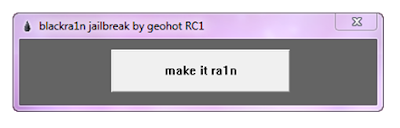
Launch blackra1n and use Windows XP compatibility mode if you’re using Windows Vista or Windows 7 (above). Click the ‘make it ra1n’ button.
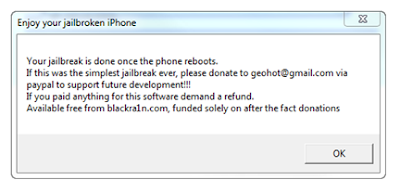
It will take sometime while your iPod Touch is being jailbroken. You will see George’s picture below, which means it’s working. Your iPod will restart on completion.
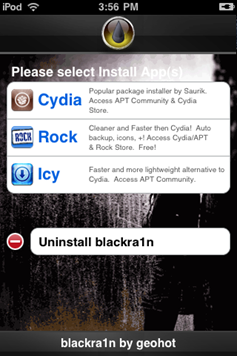
You should now be able to see the blackra1n icon in your applications list now. Launch it.
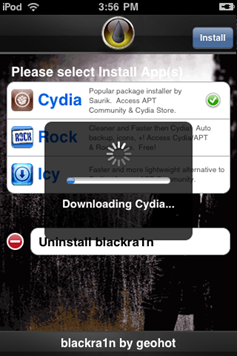
Now, you can install Cydia, which allows you to install jailbreak applications. There is an option to install Rock or Icy as well, which are alternatives to Cydia.
Once completed, you now have your iPod Touch 3.1.2 jailbreak up and running. Congratulations !
Based in Mumbai, India. I work as a Business Development Excutive and I like to blog, follow cricket, watch movies, play pool and listen to music (hip hop, vocal trance, house).
If you like my blog, please don't forget to follow me on facebook and twitter.
If you need assistance regarding any gadget queries, please feel free to contact me by filling up the contact form below.
See you around ! =)